
Featured product image
01Weak
brown bag
Stronger
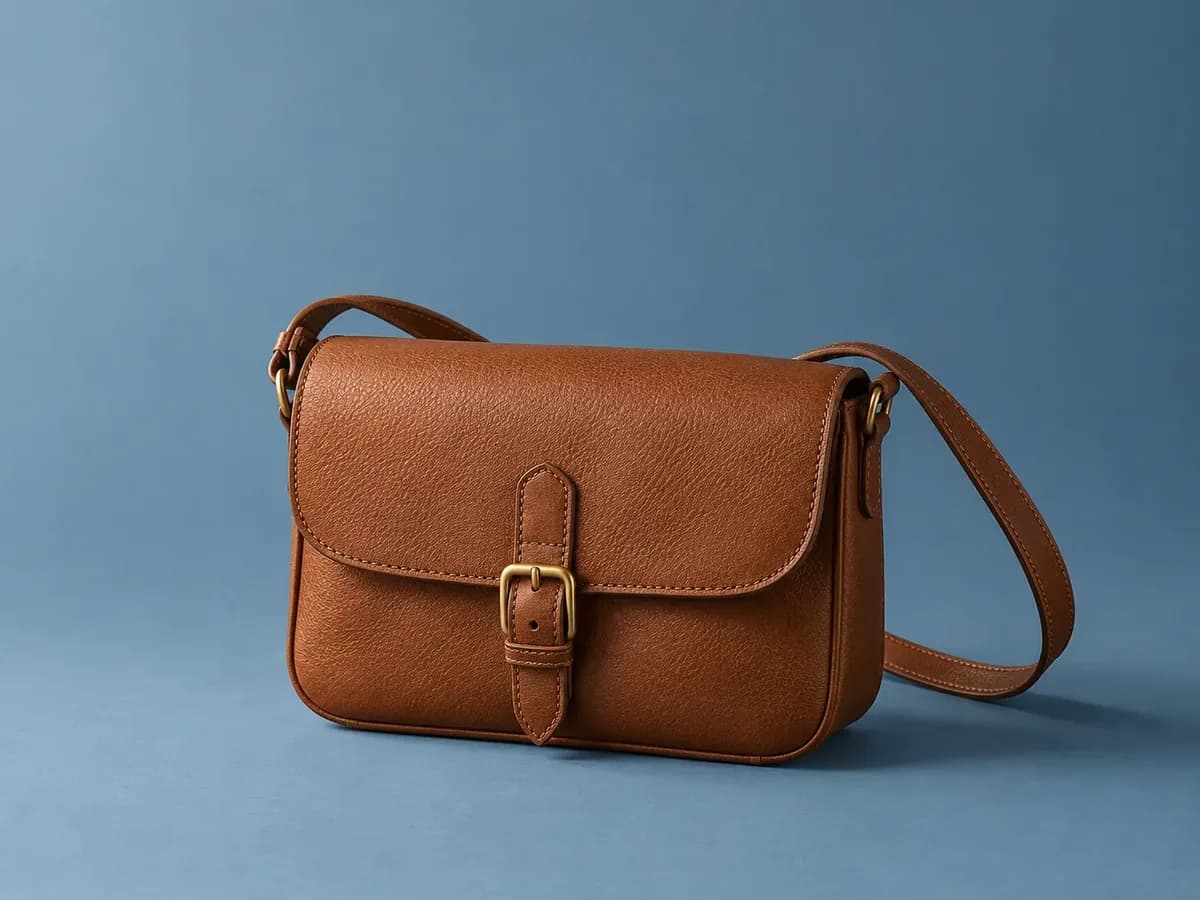
Tan pebbled crossbody bag with a front flap, brass buckle closure, and long shoulder strap
Names the bag style, color, visible texture, closure, and strap without asserting the material.
Describe bags and accessories by type, color, visible texture, closure, strap, and view, without guessing materials, capacity, or brand authenticity.
Illustrative examples. Adapt each description to the image and product context your shoppers actually receive.
Featured product image
Weak
brown bag
Stronger
Tan pebbled crossbody bag with a front flap, brass buckle closure, and long shoulder strap
What to describe
Twelve before-and-after examples
These are examples, not fill-in-the-blank guarantees. Keep only the details that are visible and relevant in the actual product image.
Weak
brown bag
Stronger
Tan pebbled crossbody bag with a front flap, brass buckle closure, and long shoulder strap
Names the bag style, color, visible texture, closure, and strap without asserting the material.
Weak
inside of bag
Stronger
Open tote showing a zip pocket and two slip pockets inside a striped lining
Tells shoppers what the interior shot adds: pockets and lining they cannot see from outside.
Weak
model with backpack
Stronger
Model wearing a black roll-top backpack that reaches from shoulders to lower back
Uses the model view to communicate size without inventing a liter capacity.
Weak
close up
Stronger
Close-up of a silver turn-lock clasp on a navy shoulder bag
Focuses on the closure only visible in the detail shot.
Weak
wallet product
Stronger
Open bifold wallet in burgundy with six card slots and a bill compartment
Counts what is visible so shoppers know the layout.
Weak
belt
Stronger
Coiled black belt with a square gunmetal buckle
Identifies color and buckle shape, the details that distinguish similar belts.
Weak
hat image
Stronger
Wide-brim straw sun hat with a black grosgrain band, side view
Brim width, band, and view help a screen reader user picture the hat.
Weak
scarf
Stronger
Square silk-look scarf with a red and cream paisley print, laid flat
Describes the print and presentation; 'silk-look' avoids claiming a fiber the photo cannot prove.
Weak
sunglasses
Stronger
Tortoiseshell round sunglasses with green lenses, front view
Frame pattern, shape, and lens color are the visible differences between styles.
Weak
bag green
Stronger
Sage green version of the mini top-handle bag, front view
Makes clear which color variant this image shows.
Weak
straps
Stronger
Crossbody bag shown with its detachable chain strap and a separate webbing strap
Lists what is pictured without implying both straps are included unless the listing says so.
Weak
woman shopping
Stronger
Woman carrying a cream canvas tote over one shoulder at a market stall
Product first, then the context that shows how it is carried.
Find before you fix
Product gallery pattern
Repeating the product name across six images hides the very information the gallery was designed to show.
Common mistakes
Weak
Genuine Italian leather luxury bag
Stronger
Tan pebbled crossbody bag with a brass buckle
Materials and origin belong in the product description where they can be verified, not inferred from an image.
Weak
Crossbody bag
Stronger
Open crossbody bag showing interior zip pocket
Each view should say what it adds.
Weak
Fits a 15-inch laptop
Stronger
Model holding an open tote with a laptop sleeve visible inside
Describe what is visible; state capacity in the description only when it is confirmed.
Shopify workflow
Shopify recommends brief, descriptive text and currently supports product-media editing from the product details screen.
Alt text is contextual. A useful description for one page may be redundant or misleading on another.
From examples to updates in your Shopify store
Lumi connects image descriptions to a controlled Shopify catalog workflow rather than treating every generated suggestion as ready to publish.
Start with the free report to sample storefront pages for missing or weak image alt text, missing meta descriptions, and page-structure findings.
Generate contextual drafts, then edit and publish the content that fits each product.
Apply approved Shopify updates, use generation history, and retain eligible-plan records of completed alt-text fixes.
Frequently asked questions
Only when it is confirmed and helps identify the item. A photo can show texture and color; it cannot prove leather type or origin. Put verified materials in the product description.
Start with 'Open' and the bag type, then list the visible compartments, pockets, or lining. That is the information the photo adds.
No. When gallery images show different angles, details, variants, packaging, or lifestyle context, the alt text should describe what is distinct about each image. A decorative or redundant image may instead need an empty alt attribute.
No. Useful alt text supports accessibility and helps search systems understand images, but the rest of your storefront matters too. Lumi uses Web Content Accessibility Guidelines (WCAG) as a reference without guaranteeing legal or ranking outcomes.
In Shopify Admin, open Products, choose a product, select a product media item, choose Add alt text, enter a brief description, and save. Shopify also supports alt text updates through product CSV workflows.
Continue the library
Write apparel alt text that identifies the garment and the visible details shoppers use to compare color, fabric, cut, fit, and styling.
View clothing examplesDescribe jewelry with visible metal color, stone shape, setting, scale, closure, and view without guessing materials, value, or authenticity.
View jewelry examplesHelp shoppers distinguish footwear by style, color, visible material, closure, toe shape, sole, heel, and the specific angle shown.
View shoes examples