
Product page
Product descriptions
The copy on the product page. Lumi drafts from your title, product details, variants, and photos, and flags details it couldn't verify, like a certification or a country of origin.
More on product descriptionsShopify app for alt text and SEO
Find missing alt text and product copy, then decide which Shopify SEO defaults need improvement. Draft from your photos and product details, review together, and publish approved updates.
Example scan5 missing · 6 on defaults
4 products checked. “Default” means Shopify fills the field from your product title or description.
The everyday collection
Fern
No alt textDefault SEO titleDefault SEO description
Interactive example. Changes stay on this page.
Current value
No image description added.
Lumi draft
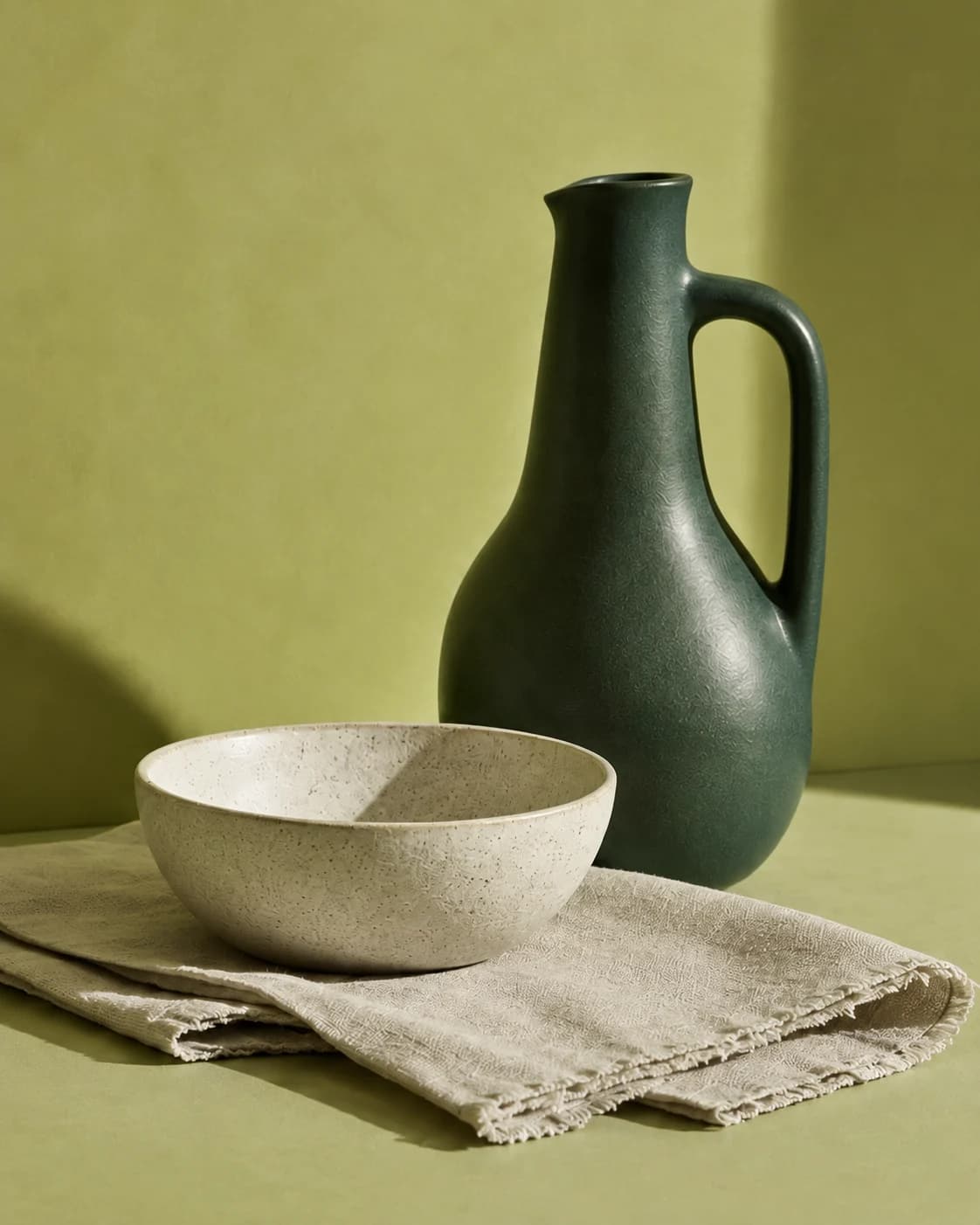
Forest-green ceramic pitcher beside a speckled bowl on folded beige linen.
Ready for your review
“Amazing! Literally fixed all my missing ALT Text in a few minutes.”
What Lumi writes for you
Work on one product or hundreds at once on a paid plan. Free runs take up to 10 products at a time. All four fields are on every plan.
The copy on the product page. Lumi drafts from your title, product details, variants, and photos, and flags details it couldn't verify, like a certification or a country of origin.
More on product descriptionsThe headline in search results. Left empty, Shopify shows your product title, which may not say what the product is. Lumi writes one for search without renaming the product.
More on SEO titlesThe summary under that headline. Left empty, Shopify usually uses the start of your product description. Lumi keeps drafts to 160 characters; Google may still rewrite them.
More on SEO descriptionsWhat screen readers and image search rely on. Written from the actual photo, not copied from the product title. Product images and Shopify Files, on every plan.
More on alt textAlso on every plan: categories and metafields. Lumi picks a Shopify product category and drafts its standard fields, like Color and Pattern, from your product facts. Fields it can’t support stay blank, and every draft waits for your approval. Shopify uses these fields for storefront filters, Google and Facebook listings, and the product data it shares with AI shopping assistants. More on categories and metafields
Missing or default?
An image with no alt text gives screen readers and image search nothing. A product with no description leaves shoppers guessing. Those are real gaps, and Lumi counts them first.
Empty SEO fields are different. Shopify fills in the search listing with your product title and the start of your description. Lumi lists those separately, so you can decide where a custom one is worth it: a product called “Fern” whose search listing never says pitcher, or a snippet that opens with a shipping notice.
| Product | Product description | Alt text | SEO title | SEO description |
|---|---|---|---|---|
| Fern | Filled | Missing | Shopify default | Shopify default |
| Speckled Stoneware Bowl | Filled | Missing | Filled | Shopify default |
| Linen Table Runner | Missing | Missing | Shopify default | Missing |
| Oak Serving Board | Filled | Filled | Shopify default | Shopify default |
The Linen Table Runner has no description, so its SEO description has nothing to fall back on. That counts as missing.
How it works
Five steps, all inside Shopify admin.
Try reviewing a runAfter install, Lumi counts the products missing descriptions, alt text, SEO titles, and SEO descriptions, field by field. Free checks your top 100 Online Store products; paid plans check the whole catalog.
Filter by vendor, collection, or product type, then pick the products and fields to draft. Free runs take up to 10 products; paid plans take more.
Lumi drafts descriptions and SEO fields from your product details and writes alt text from each actual photo. Filled fields are skipped unless you choose to rewrite them.
Filter the run by field or status, approve clean drafts a page at a time, and edit or reject the flagged ones. Find and replace fixes a repeated phrase across every draft.
Only approved drafts publish. Each publish is logged in Published changes, which you can export, and you can restore the previous value unless the field changed again since.
Reviewing a run
Shopify’s native AI can help with edits and reviewed tasks. Lumi brings catalog gap checks, selected fields, flagged drafts, and publish records into one workflow for your backlog.
Lumi checks each product description for measurements, materials, and claims like “organic”, “warranty”, or “made in”, and flags any it can’t find in your product data. It also flags drafts that run past the length limit or failed to publish before. Flagged drafts stay out of bulk approval unless you include them. The check can miss things, so it points you to the drafts worth reading closely.
Runs you start stop at drafts until you publish. Optional automation on Maintain can publish on its own, only if you turn it on.
Try it: turn on Only flagged drafts. Edit the runner description to remove “Made in Portugal” and its flag clears. Turn the filter off to select and approve the drafts you have reviewed.
Run review
4 products · 8 drafts
Interactive example. Changes stay on this page.
0 of 8 drafts have a decision
Fern · Alt textNeeds review
Forest-green ceramic pitcher beside a speckled bowl on folded beige linen.
Fern · SEO titleNeeds review
Forest Green Ceramic Pitcher with Easy-Pour Spout | Fern
Speckled Stoneware Bowl · Alt textNeeds review
Speckled cream stoneware bowl, shown empty from above on a pale wooden table.
Speckled Stoneware Bowl · SEO descriptionNeeds review
A speckled stoneware bowl sized for salads, pasta, and fruit, with a soft matte glaze.
You stay in control
See current and proposed copy side by side. Edit any word, regenerate, or reject it. Every plan includes regeneration and draft history, within your credits.
Optional automation on Maintain is off until you turn it on and only fills empty fields. Once on, it starts set to create drafts for review unless you choose to publish automatically. Set a monthly credit limit for it, and Lumi emails you a daily summary on days it creates or publishes content.
Lumi saves the previous value before it publishes, so you can restore it in a click. If someone edits that field in Shopify later, or a newer publish replaces it, Lumi won’t overwrite that work.
Published changes lists each field Lumi published, when, whether a run or automation did it, and the value it replaced. Export it as a CSV on any plan.
Optional on Maintain
Keep up as your catalog grows. On Maintain, Lumi can draft the empty fields you choose when you add a product and fill in missing alt text after updates. It only fills empty fields and uses your monthly credits.
Off until you turn it on. New automation settings create drafts for review. Choose automatic publishing if you want to skip that step. Existing stores keep their saved choice.
Also included
Free scans 10 storefront pages every 30 days, One-Time Cleanup scans 100 pages once, and Maintain scans 200 pages every 14 days. Missing alt text it finds goes straight into a Lumi run. Anything else is listed with the page it’s on, so you can pass it to whoever looks after your theme.
Read our accessibility guideSimple pricing
Credits count drafts, not products. A product description uses 2 credits; alt text, an SEO title, or an SEO description uses 1. Categories and metafields use 1 per product.
One-Time Cleanup gives you all 3,000 credits now, with no per-run limit and no subscription. Maintain adds 500 credits every month, plus optional automation for new products.
$0No subscription charge
For trying the workflow on real products.
Best for a backlog
$79one-time
For clearing a backlog once, without another subscription.
$19/month or $190/year
For stores that add products every month.
A worked example for products that need everything: a product description (2 credits), an SEO title and an SEO description (1 each), and alt text for each photo (1 each). Skip fields that are already good and the same credits go further. Regenerating a draft uses its credits again.
| Each product needs | Free100 credits a month | One-Time Cleanup3,000 credits | Maintain500 credits a month |
|---|---|---|---|
| All four fields, one photo5 credits | 20 products a month | 600 products | 100 products a month |
| All four fields, three photos7 credits | 14 products a month | 428 products | 71 products a month |
Not from a run you start. Runs you start always create drafts for review, and you compare the current and proposed copy before publishing. On Maintain, optional automation for new products and missing alt text is off until you turn it on. Once on, it starts set to create drafts for review, unless you choose to publish automatically. You can also set a monthly credit limit for automation, and Lumi emails you a daily summary on days automation creates or publishes content.
Only when you choose to. Lumi fills empty fields by default, runs you start create drafts, and your existing content stays as it is until you publish a replacement. Rewriting existing content is something you pick. Optional automation on Maintain only fills fields that are empty.
Credits count drafts, not products. An alt text, SEO title, or SEO description draft uses one credit. A product description draft uses two. Categories and metafields use one credit per product, however many fields Lumi drafts. If some items fail or you cancel, finished drafts stay. Unused credits return after completion checks; if a Shopify publication is awaiting confirmation, reconciliation waits for that check. Confirmed published work stays charged. Compare plans and credits
Usually, yes. Lumi saves what was there before it publishes, so you can preview the previous Shopify value and restore it in a click. Two things block a restore: someone edited that field after Lumi published, or a newer publish replaced it. Lumi won't overwrite that later work. Uninstalling deletes the saved previous values, so export Published changes first if you want a copy.
You may not. When the SEO title is empty, Shopify uses your product title, and when the SEO description is empty, it usually uses the start of your product description. That works when the product title says what the product is. It doesn't when the title is a name like “Fern”. Lumi lists those fields separately from missing alt text and descriptions, so you can fix the real gaps first and only replace defaults that read badly in search.
Lumi drafts from your own product details and photos, and it is instructed not to invent claims. For product descriptions it then checks measurements, materials, and wording like “organic”, “warranty”, or “made in” against your product data, and flags any it can't match. The check can miss things, so read the facts in flagged drafts before you publish.
No one can promise rankings. What changes is what search engines and shoppers see: a search listing that says what the product is, a summary written for it, and images that screen readers and image search can understand.
Lumi reads and writes products and file alt text. It doesn't request customer or order records. Product details and images you choose to draft are sent to AI model providers to write the drafts. Security and data handling
Lumi installs no scripts, widgets, overlays, or theme code on your storefront. It fills Shopify's own product fields, which your theme already displays.
No. SEO titles go into the page title field under Search engine listing in Shopify. The product title shoppers see on your store stays the same.
Yes. The Free plan includes 100 credits every month for product descriptions, image alt text, SEO titles, SEO descriptions, and product categories and metafields in English, so you can run the whole workflow (find, draft, review, publish) on real products. One-Time Cleanup and Maintain add your brand voice, 17 writing languages, and bigger runs, plus optional automation on Maintain.
Start with one run on Free: pick 10 products, draft their alt text and SEO fields, and publish what you approve. With three photos each, that uses 50 of your 100 monthly credits.